XBRL Validation Pipeline
TL;DR
Agentic FinSearch ships with a deterministic, user-triggered pipeline that
checks the numerical claims in any agent response against SEC XBRL filings.
Click Validate below a response to get a per-claim verdict (Verified,
Mismatch, Skipped, Not Applicable) and the exact filing used as
ground truth, surfaced inside the existing Sources popup.
Overview
Accurate retrieval of real-time financial data is a core piece of infrastructure
for AI agents that answer financial questions. Agent-generated financial text
still contains numerical claims that a user cannot verify at a glance — a
$12.3 billion revenue figure and an 18% growth rate shown in the same
paragraph look equally authoritative whether one, both, or neither are grounded
in an SEC filing.
The XBRL Validation Pipeline closes that gap. It is a three-stage process — tagging → retrieval → matching — that operates on the agent’s response, not on the upstream tool calls. Every claim that the pipeline processes emerges with a verification badge inline in the response and a citation to the original filing in the Sources popup.
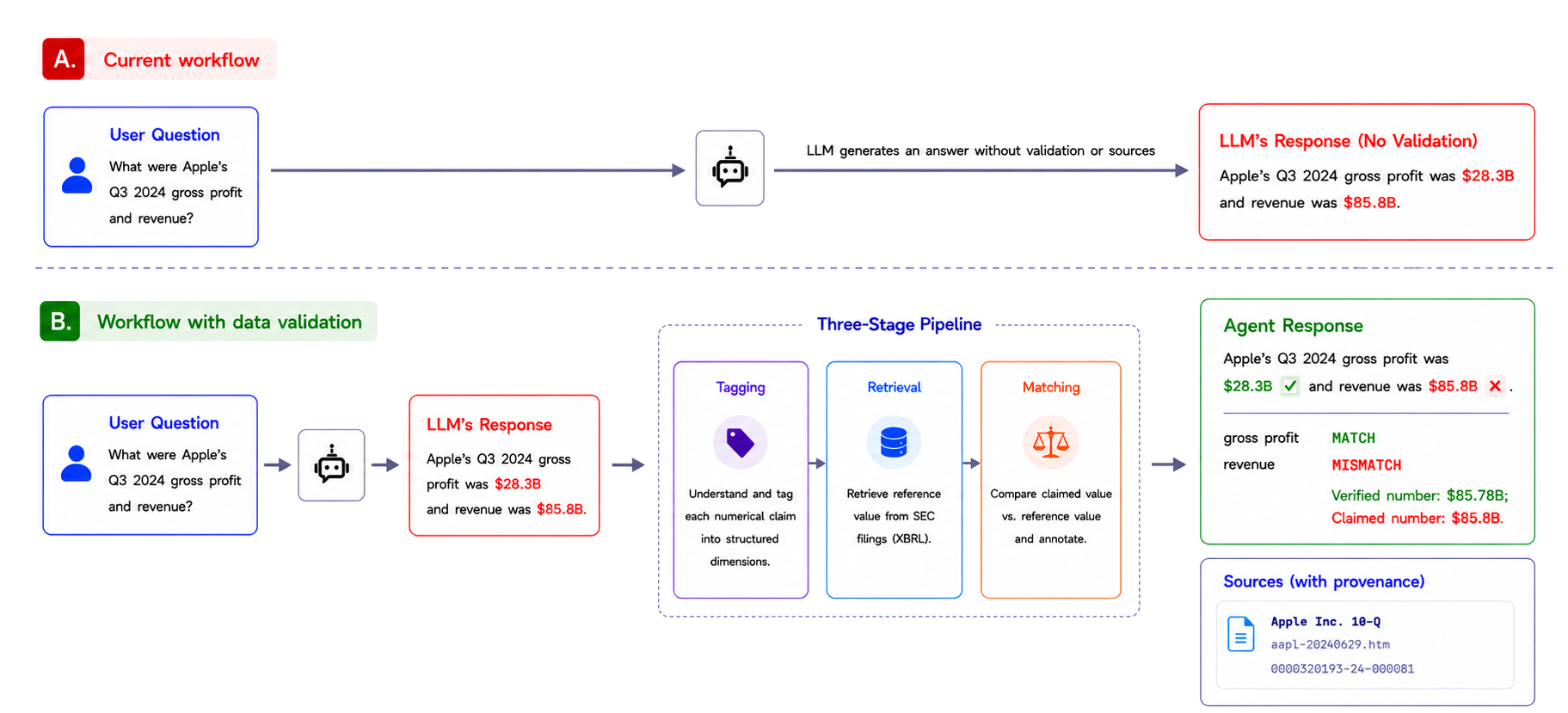
Fig. 1 Top: baseline LLM workflow — the model emits numerical claims without validation or provenance. Bottom: the same response routed through the three-stage pipeline. Each claim is tagged against US-GAAP, the reference value is retrieved from SEC filings, and the result is annotated in the response with provenance shown in the Sources popup.
The Verification Problem
Large language models generate financial text fluently, but their numerical claims are often wrong. Retrieval-augmented pipelines reduce — but do not eliminate — the failure. In production, a user reading a FinAgent response has no way to tell which numbers are grounded in a real SEC filing and which were fabricated. The model speaks all numbers with equal confidence.
Agentic FinSearch already surfaces source filings in its Sources popup, but that does not verify individual numerical claims. A user who wants to audit a specific figure today must open the filing, search for the relevant line item, and cross-check by hand. For an agent that produces dozens of numerical claims per response, that workflow is not realistic.
The concrete gaps the pipeline closes:
No automatic check of individual numerical claims against SEC filings.
No per-claim visual indicator inside the response text.
No reusable verification primitive that other FinAgent prototypes can adopt.
Three Stages
The pipeline takes an AI-generated financial claim as input and returns the same claim annotated with a verification badge. Each stage is a single-responsibility module — decoupled, independently testable, and reusable by other FinAgent prototypes.
Stage 1: Tag the Claim
A natural-language claim such as “Apple’s Q3 2024 gross profit was $28.3 billion” is decomposed into six structured dimensions:
entity — CIK and ticker
concept — US-GAAP tag
period — ISO 8601 instant or duration
unit — currency and scale
context — segment or dimension
value
The concept field is filled by the XBRL tagging module, which performs
retrieval-then-select over the FASB 2026 US-GAAP taxonomy so the agent never
fabricates tag names. The output is a structured record that any
XBRL-compliant store can resolve.
Stage 2: Retrieve the Reference Value
Given a tagged record, Stage 2 looks up the reference value from an
authoritative SEC source. Today’s implementation reads from a small local
index of XBRL filings shipped inside the repository at
Main/backend/mcp_server/xbrl/filings/.
Coverage today
Validation currently resolves against three pre-loaded SEC filings:
Apple (FY2023, aapl-20230930.xml), Microsoft (FY2023,
msft-20230630.xml), and Tesla (FY2023, tsla-20231231.xml). Claims
about any other ticker or period return Skipped with a “filing not
found” reason. Expanding this set is the focus of the upcoming
SEC XBRL Filing Tree work.
The return value is a tuple of (value, filing accession, filing date).
Stage 3: Match and Annotate
Stage 3 compares the tagged claim value against the reference value:
A match within tolerance is marked Verified (green ✓).
A clear mismatch is marked Mismatch (red ✗), with the variance percentage.
A claim that cannot be resolved (missing tag, missing filing, unit mismatch) is marked Skipped, and the reason is surfaced to the user.
A claim whose metric is not defined for the filing (e.g., current ratio on an unclassified balance sheet) is marked Not Applicable.
Every result — including Skipped and Not Applicable — carries the
filing accession and filing date as provenance, both inline in the response
and inside the Sources popup.
Using Validate
Ask a financial question that elicits a ratio or balance-sheet figure, for example: “What was Apple’s gross margin for FY2023?” or “Summarize Tesla’s Q4 2023 balance sheet.”
After the response renders, a Validate button appears in the response toolbar only if the response emitted at least one supported claim. If the response did not contain a verifiable numerical claim, the button is hidden.
Click Validate. The pipeline runs deterministically on the claims the agent emitted — no second LLM pass — and returns one verdict per claim.
Read the verdict chips rendered just below the response. Mismatches are underlined in red inline so you can locate the offending number in the prose without scanning.
Open the Sources popup to see the XBRL filings used as ground truth, grouped under a new
Ground Truthsubsection alongside any other sources the agent cited.
Verdict Statuses
Status |
Badge |
Meaning |
|---|---|---|
Verified |
✓ green |
The claimed value matches the value in the filing within tolerance
( |
Mismatch |
✗ red |
The claimed value differs from the filing value by more than tolerance. The variance percentage is shown on the chip; the claimed number is underlined in red inline. |
Skipped |
— gray |
The ratio could not be evaluated — typically because a required US-GAAP tag was missing from the filing, the period did not resolve, or the unit was incompatible. The chip surfaces the reason. |
Not Applicable |
⊘ slate |
The ratio is undefined for this filer. Example: |
Current Implementation (Layer 1 MVP)
The pipeline in production today is the Layer 1 MVP: three accounting identities, evaluated against local XBRL filings, triggered by the user.
Equation |
Family |
Sample demo question |
|---|---|---|
|
Accounting identity |
“Summarize Tesla’s Q4 2023 balance sheet.” |
|
Profitability |
“What was Apple’s gross margin for FY2023?” |
|
Liquidity |
“What is Microsoft’s current ratio as of FY2023?” |
The accounting identity is evaluated as A = L + TempEquity + E so that
filers with redeemable non-controlling interests (e.g., Tesla) verify cleanly
— omitting TempEquity produces a spurious 0.2% failure on otherwise
valid data. For filers without NCI (Apple, Microsoft), TempEquity defaults
to zero.
Why “Layer 1”? The pipeline is the first layer of the FinSearch four-layer architecture. Each layer expands the validation surface — Layer 2 adds runtime claim harnessing across long-form reports, Layer 3 grafts the pipeline into XBRL-grounded sandboxes, and Layer 4 hosts the whole stack as cloud-native Financial Truth Infrastructure.
Roadmap
The module boundary is stable; the surface widens on a defined schedule.
SEC XBRL Filing Tree (cloud). The most visible limitation today is that only three filings are bundled with the backend. The next major workstream is a cloud-hosted SEC XBRL Filing Tree — a structured, query-friendly index of XBRL filings keyed by
(ticker, period, statement)— that any agent can hit over the network without bundling raw filings into the repository. Once it ships, the resolver swaps its filesystem lookup for a tree query, and validation extends from three tickers to the full universe of SEC registrants. The local-filings path remains as the offline fallback for development and air-gapped demos.Additional ratios. Income statement identity, cash flow reconciliation, debt-to-equity, return on equity. Each ratio is one tag map and one pure function — the engine and resolver do not change.
Streaming validation. Today’s Validate is lazy; Layer 2 will surface per-claim verdicts as the response streams.
Coverage benchmark. Target ≥80% verification coverage on the 24-question FinSearch benchmark, where a claim counts as covered if all three stages produce any verdict — measured after the Filing Tree lifts the three-filing coverage ceiling.
Further Reading
MCP Tools Integration — the MCP tool surface, including
query_xbrl_filingandreport_claimthat this pipeline uses internally.API Reference — the
/api/axioms/validate/and/api/axioms/has_claims/REST endpoints that back the Validate button.Project Structure — where the
Main/backend/axioms/modules sit in the broader backend.
For the engineering design records that accompanied the build, see the
Docs/superpowers/specs/ directory:
2026-03-31-xbrl-verification-design.md— original 4-step verification proposal (filing-vs-contract use case).2026-04-07-axiom-engine-design.md— first axiom (A = L + E) with the tool-wrapper intercept approach. Superseded by the user-triggered Validate design below but kept for history.2026-04-13-numbers-ratios-layer-design.md— the design that shipped: three ratios,report_claimagent tool, Django claim registry, and the Validate REST endpoints.